AIVory Architect · Infrastructure
Design clouds visually. Infrastructure as drag-and-drop.
Design AND operate your cloud, without leaving your IDE.
Visual Infrastructure as Code for DevOps teams. Drag-and-drop design, auto-generated Terraform, Kubernetes, and Docker configs. Plus real-time logs, SSH access, and container management, all in one tool.
Visual designer · Auto-generated code · SSH & logs in IDE
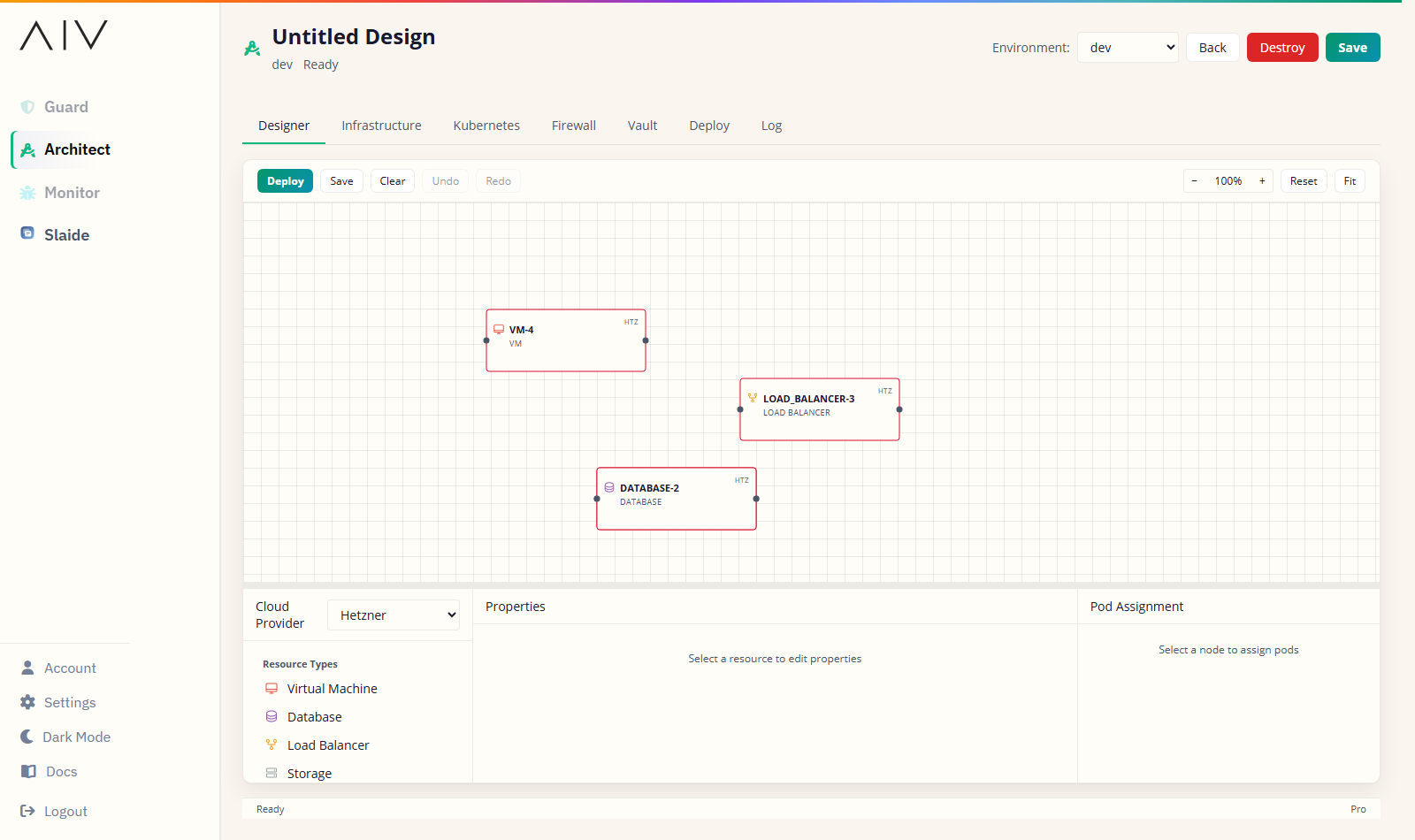




Where Architect runs
Your IDE, your browser, or your Jira board.
Architect meets your team where it already works. Pick a plugin, open the web app, or link it from Jira.

JetBrains IDEs
Design and deploy without leaving IntelliJ, WebStorm, or PyCharm.

VS Code
The full designer as a VS Code extension.

Cursor
Design infrastructure next to your AI pair programmer.

Antigravity
Native support in the Antigravity editor.
New
Web app
Open the designer straight in the browser. No install.

Jira
Open the designer inside Jira. Link an AIVory account to share designs with the web app and your IDE.
Why infrastructure management is broken.
Complex configs, fragmented tools, and constant context switching slow teams down every day.
Infrastructure as Code is extremely difficult
Writing Terraform HCL, Kubernetes YAML, and Docker configs by hand is error-prone. Even AI-generated IaC is hard to visualize and validate.
Steep learning curve
Mastering Terraform, Kubernetes, Docker, and cloud platforms takes months. Most teams feel overwhelmed.
Complex syntax
YAML indentation, HCL syntax, Docker compose files. Each tool has different rules you need to memorize.
Documentation overload
AWS has 200+ services, each with extensive docs. Finding the right configuration is like finding a needle in a haystack.
DevOps tools are fragmented
Most DevOps teams use 5+ tools just to design, deploy, and operate their cloud infrastructure.
Too many tools
Draw.io for diagrams. Terraform CLI for deployment. Cloud console for monitoring. Terminal for SSH. Lens for K8s. It's exhausting.
Constant context switching
Jump between IDE, terminal, browser, and cloud console dozens of times a day. Each switch breaks your flow.
Diagrams ≠ reality
Your architecture diagram was accurate… 6 months ago. Now it's just a pretty picture that doesn't match production.
One tool for the complete infrastructure lifecycle.
Design visually. Deploy automatically. Operate from your IDE.
Design
Visual drag-and-drop interface. No YAML or HCL required.
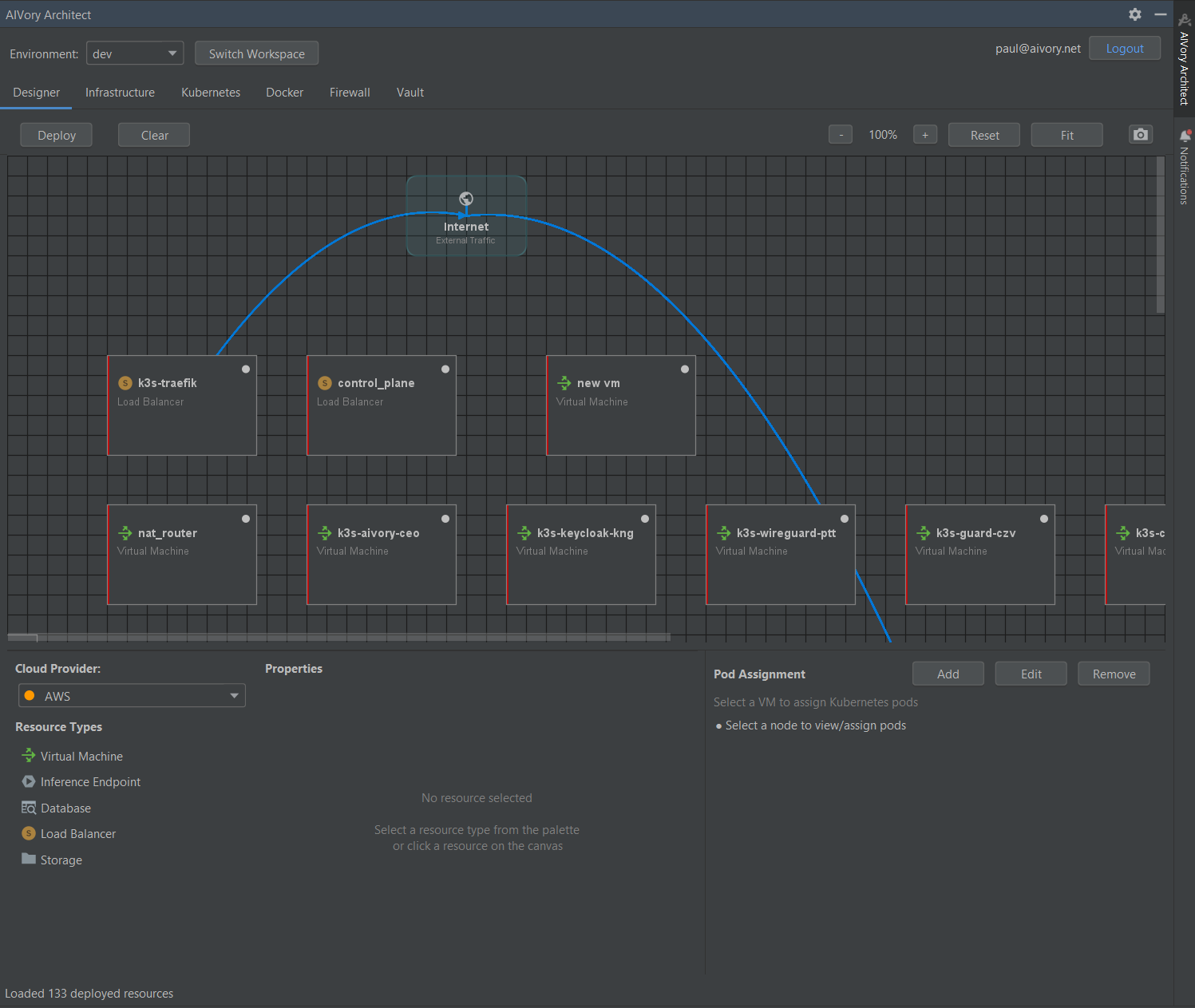
Deploy
Auto-generate Terraform, K8s, Docker. One-click deployment.
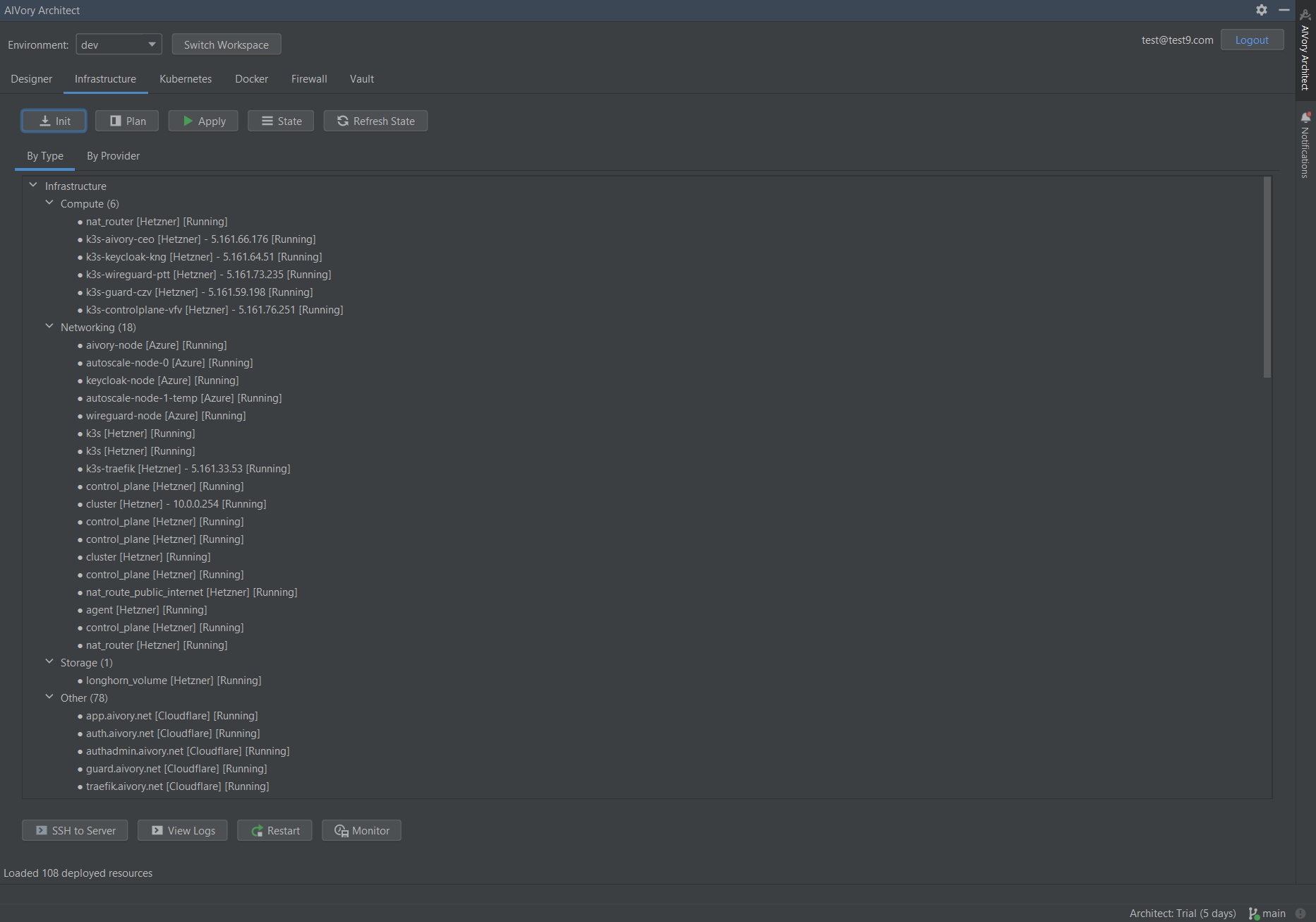
Operate
Real-time monitoring, SSH, logs, pod management, all in IDE.
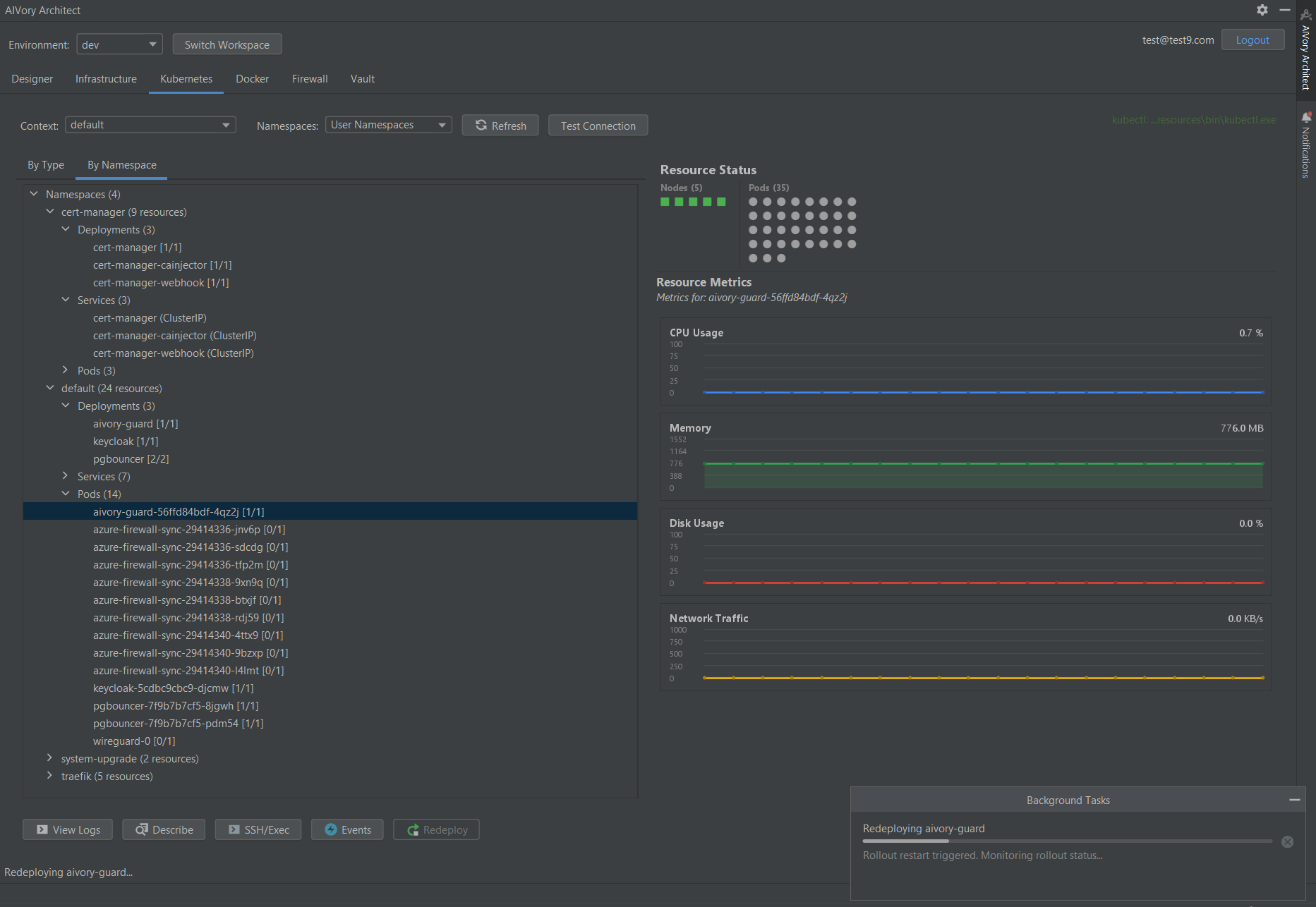
Design and deploy infrastructure in minutes, not days.
Start 7-day free trialOperate your infrastructure without leaving your IDE.
Design is a one-time activity. Debugging, monitoring, and troubleshooting happen every day. Architect gives DevOps teams daily operational value.
Real-time monitoring
CPU, memory, disk usage tracking from your IDE. See server health at a glance without switching to cloud consoles.
One-click SSH access
Direct server access without terminal switching. Click on any server in your architecture and SSH in immediately.
Live log streaming
Real-time infrastructure logs in your editor. Debug production issues without leaving your code.
Kubernetes pod management
Manage deployments without kubectl. Scale, restart, and inspect pods visually from your IDE.
Terraform execution
Run init, plan, apply directly from the IDE toolbar. No terminal context-switching needed.
Container management
Start, stop, restart containers. View container logs and exec into running containers, all from your IDE.
Architect at work.
Design your infrastructure visually, then operate it without leaving your IDE.
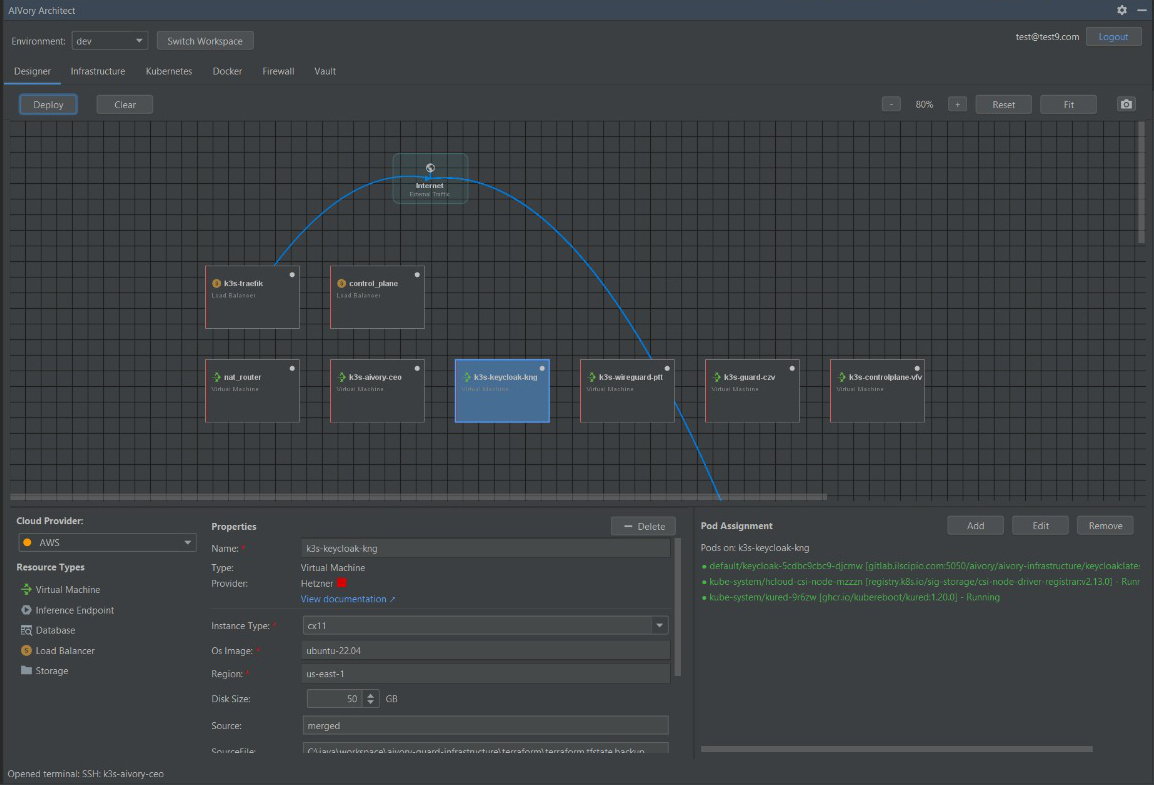 Design
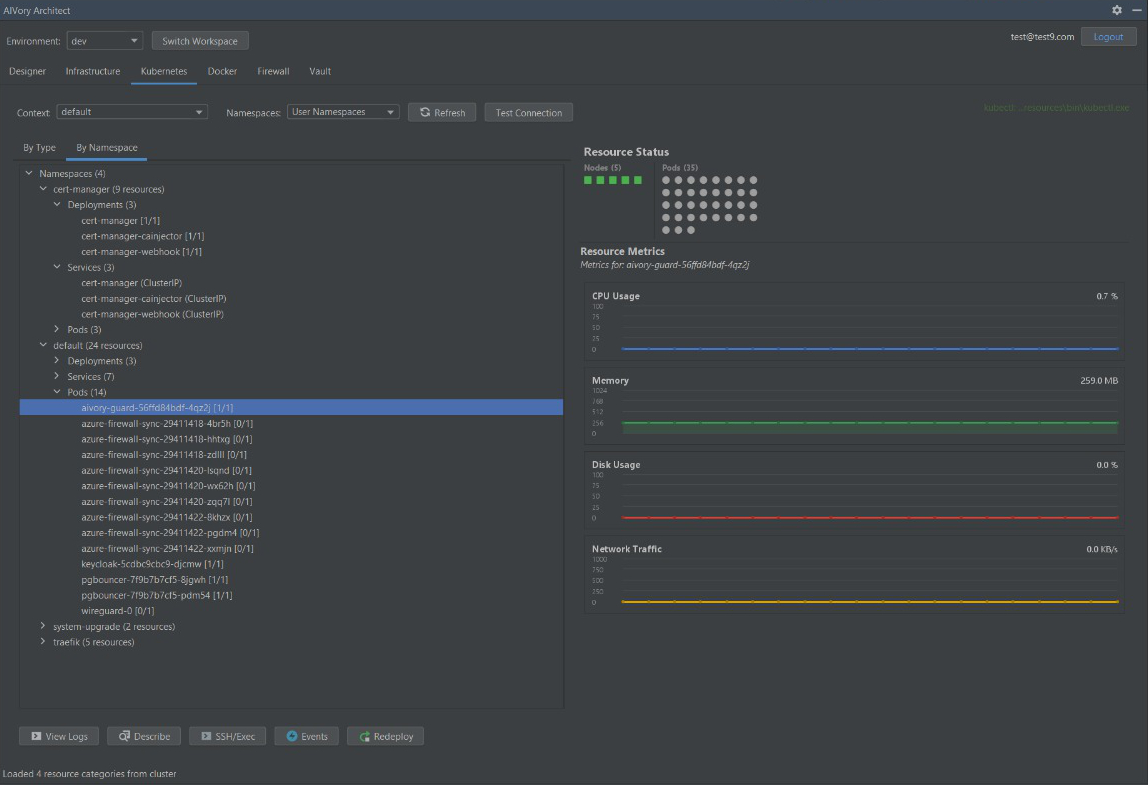 Operate
One tool for the complete lifecycle, no context switching between apps.
Ready to try it yourself?

Explore free, deploy when ready.
Browse and visualize your infrastructure for free. Upgrade to take action.
Free Viewer
Understand any infrastructure instantly.
- Interactive topology visualization: see your entire infrastructure as a visual graph, auto-generated from your config files.
- Full config file access: browse Terraform, Kubernetes, Docker Compose, .env files with syntax highlighting.
- All IDE integrations: VS Code, JetBrains, Cursor, Antigravity.
Premium Plans
From $9.99/month.
Everything in Free Viewer, plus full control:
- Deploy resources: one-click deployment to any connected cloud provider.
- Execute commands: run kubectl, terraform, docker commands from IDE.
- Save & sync designs: persist your infrastructure designs to the cloud.
- Secrets management: secure vault operations for credentials and configs.
- SSH & log streaming: direct server access and real-time logs.
- Pod & container management: scale, restart, exec into running containers.
Why Architect is different.
No other tool bridges visual Infrastructure as Code design with genuine operational capabilities.
| Tool | Visual design | Code gen | SSH / logs | Monitoring | K8s mgmt |
|---|---|---|---|---|---|
| AIVory Architect | |||||
| Brainboard | Drift only | ||||
| Cloudcraft | |||||
| Lens / Portainer |
See why teams are switching to Architect.
Start 7-day free trialMulti-cloud infrastructure.
One unified interface for AWS, Azure, GCP, Hetzner, and more. True multi-cloud without vendor lock-in.
Same visual IaC interface for all cloud providers. Switch providers without rewriting configs.
Up and running in 30 seconds.
Install plugin → Draw architecture → Deploy and operate.
1. Open IntelliJ IDEA / PyCharm / WebStorm
2. Go to Settings → Plugins
3. Search for "AIVory Architect"
4. Click Install
5. Restart IDE1. Open Architect (Tools → AIVory Architect)
2. Drag components to canvas, connect them
3. Deploy - code auto-generates
4. Monitor servers, stream logs, SSH in
5. All from your IDE - no context switching!# From VS Code Marketplace
1. Open VS Code
2. Press Ctrl+Shift+X (Cmd+Shift+X on Mac)
3. Search for "AIVory Architect"
4. Click Install
# Or via command line
code --install-extension aivory.architect1. Open Command Palette (Ctrl+Shift+P)
2. Run "AIVory Architect: Open Designer"
3. Drag & drop infrastructure components
4. Deploy with one click
5. Stream logs, SSH, manage pods - all in VS Code!# Install from Extensions Marketplace
Ctrl+Shift+X → Search "AIVory Architect" → Install
# Or from OpenVSX Registry
Settings → Extensions → OpenVSX
Search: aivory.architect → Install1. Open Architect Designer (Ctrl+Shift+P)
2. Describe your infrastructure to Cursor AI
3. AI generates visual diagram automatically
4. Deploy, then monitor and debug
5. SSH, logs, pod management - all in Cursor!Trusted by Security-First Teams
Companies that build with confidence

"As avid users ourselves at our agency, we can vouch for AIVory working. It's become indispensable for keeping our client projects compliant while moving fast with AI-assisted development."

"With AIVory, our developers can move fast with AI assistance while staying compliant. It's the perfect balance of speed and security."
Love our work?
Common questions.
What is AIVory Architect?
Architect is a visual Infrastructure as Code tool that runs inside your IDE, in the browser, or in Jira. You drag and drop cloud components on a canvas, Architect auto-generates Terraform, Kubernetes, and Docker configs, then lets you deploy, monitor, SSH, and manage containers without leaving the tool.
Is there a free version?
Yes. The free viewer lets you visualize any infrastructure as an interactive topology graph and browse all config files with syntax highlighting. Premium plans starting at $9.99 per month unlock deployment, SSH access, log streaming, pod management, and design persistence.
Which cloud providers are supported?
Architect supports AWS, Azure, Google Cloud, Hetzner, RunPod, and Cloudflare today. The same visual interface works across all providers, so you can design multi-cloud architectures without vendor lock-in or rewriting configs.
Does it generate real Infrastructure as Code?
Yes. Every component you place on the canvas produces production-ready Terraform HCL, Kubernetes YAML, or Docker Compose files. You can edit the generated code directly, and changes sync back to the visual canvas in real time.
Can I manage existing infrastructure?
Yes. Point Architect at an existing Terraform state, Kubernetes cluster, or Docker Compose project and it auto-generates the visual topology. From there you can monitor, SSH in, stream logs, and manage pods; no migration required.
Which IDEs are supported?
Architect runs in JetBrains IDEs (IntelliJ, PyCharm, WebStorm, GoLand, and others), VS Code, Cursor, and Antigravity. A standalone web app runs the same designer in your browser, no install required.
Is there a Jira app?
Yes. AIVory Architect for Jira opens under Apps > AIVory Architect in your Jira site: the same designer, Terraform, deploys and Kubernetes view as the web app. Your Jira site keeps its own designs. Link an AIVory account to open them on the web and in your IDE. It is on the Atlassian Marketplace at $30 per month for up to 10 users, then $3 per user per month, billed through Atlassian, with a 30 day free trial.
How does Team pricing work?
Team gives every user Premium features for $19 per user per month, billed annually, with a 5 seat minimum. Add and remove seats under Billing > Seats. The Team plan also comes to the AWS and Azure Marketplaces, with private offers above 25 seats.
How do I get support?
One path for every surface. Mail [email protected] for an answer within one business day, open a bug or feature request on GitHub Issues, or read the documentation. Security questions: see Security and data.
How is Architect different from Brainboard or Cloudcraft?
Other tools stop at diagrams or code generation. Architect is the only tool that combines visual IaC design with full operational capabilities: one-click SSH, real-time log streaming, Kubernetes pod management, container exec, and Terraform execution, all inside your IDE, browser, or Jira. Design and operations in one place.
Your next cloud diagram is also the deploy.
Visual Infrastructure as Code with built-in DevOps operations, the complete lifecycle in your IDE, browser, or Jira.