




Real-time protection
See violations highlighted instantly as you code — human or AI-generated.
AIVory Guard · Compliance
Real-time validation for 18+ standards (OWASP, GDPR, HIPAA, PCI-DSS, SOC 2) in your IDE and for your AI agent. Catch violations as you type — before commit, before deploy, before audit.
OWASP free forever · 18+ standards · MCP-compatible
Available for
One compliance violation in production can cost your company millions. Here's why catching them early matters.
# GitHub Copilot generated this yesterday:
$100
per violation caught while coding
$3K–5K
per violation found in production
30–50× more expensive to fix after deployment
Real-time compliance scanning in your IDE. Catch violations as you type — before commit, before deploy, before audit.
See violations highlighted instantly as you code — human or AI-generated.
GitHub Copilot CLI, Cursor, Claude Code, Windsurf — all write compliant code automatically.
Don't just see problems — fix them instantly with suggested remediation.
Install plugin → Select frameworks → Start coding safely.
VS Code, JetBrains, Cursor, Windsurf — same extension, same rules.
Rules evaluate every edit. Violations show inline with a standard reference, never a wall of output.
Guard proposes a fix that keeps your tests green. Accept, reject, or edit. Commit clean.
1. Open IntelliJ IDEA / PyCharm / WebStorm
2. Go to Settings → Plugins
3. Search for "AIVory"
4. Click Install
5. Restart IDE1. Open AIVory settings (Tools → AIVory)
2. Select compliance frameworks:
✓ GDPR ✓ HIPAA
✓ SOC 2 ✓ PCI-DSS
✓ ISO 27001 ✓ OWASP
... and 12+ more
3. Click Apply
4. Start coding with real-time protection!# From VS Code Marketplace
1. Open VS Code
2. Press Ctrl+Shift+X (Cmd+Shift+X on Mac)
3. Search for "AIVory"
4. Click Install
# Or via command line
code --install-extension aivory.aivory1. Go to Settings (Ctrl+,)
2. Search for "AIVory"
3. Enter API token from app.aivory.net/tokens
4. Extension starts scanning automatically!
# Works with GitHub Copilot, Codex, etc.# 1. Install AIVory Extension
Ctrl+Shift+X → Search "AIVory" → Install
# 2. Setup MCP for AI commands (optional)
# Create .cursor/mcp.json:
{
"mcpServers": {
"aivory": {
"command": "npx",
"args": ["--yes", "@aivorynet/guard"],
"env": {"AIVORY_API_KEY": "your_key"}
}
}
}# Create .cursorrules in project root
When writing or modifying code:
1. Write the code as requested
2. Extension scans automatically (inline warnings)
3. Use /aiv:scan for detailed MCP scan (optional)
4. Fix all violations before completing
# Cursor + AIVory = Compliant AI code!# For Claude Code — no API key needed for OWASP
claude mcp add --transport stdio aivory -- npx -y @aivorynet/guard
# For other AI agents, add to config
{
"mcpServers": {
"aivory": {
"command": "npx",
"args": ["-y", "@aivorynet/guard"]
}
}
}# OWASP scanning available immediately — no setup required.
# For all 18+ standards (GDPR, HIPAA, etc):
# Get API key from https://app.aivory.net/tokens
export AIVORY_API_KEY=your_key# Add AIVory marketplace
/plugin marketplace add aivorynet/claude-marketplace
# Install the plugin
/plugin install aiv
# Initialize configuration
/aivory:init# Create CLAUDE.md in project root
## AIVory Compliance Scanning
When writing or modifying code:
1. Write the code as requested
2. Call /aiv:scan to check violations
3. Review results and fix violations
4. Re-scan before completing# Install GitHub Copilot CLI
brew install github/gh-cli-copilot/gh-copilot
# Authenticate
gh auth login
gh copilot auth
# AIVory MCP setup in ~/.config/github-copilot/mcp/# Start Copilot CLI
gh copilot
# Ask to scan with AIVory
> Scan my auth.js with AIVory for OWASP compliance
# Get API key: https://app.aivory.net/tokens# Create Windsurf MCP config
mkdir -p ~/.codeium/windsurf
cat > ~/.codeium/windsurf/mcp_config.json <<'EOF'
{
"mcpServers": {
"aivory": {
"command": "npx",
"args": ["--yes", "@aivorynet/guard"],
"env": {
"AIVORY_API_KEY": "your_key"
}
}
}
}
EOF
# Restart Windsurf# Create .windsurfrules in project root
When writing or modifying code:
1. Write the code as requested
2. Use AIVory scan_code tool to check violations
3. Review results and fix violations
4. Re-scan before completingTrace your compliance status everywhere.
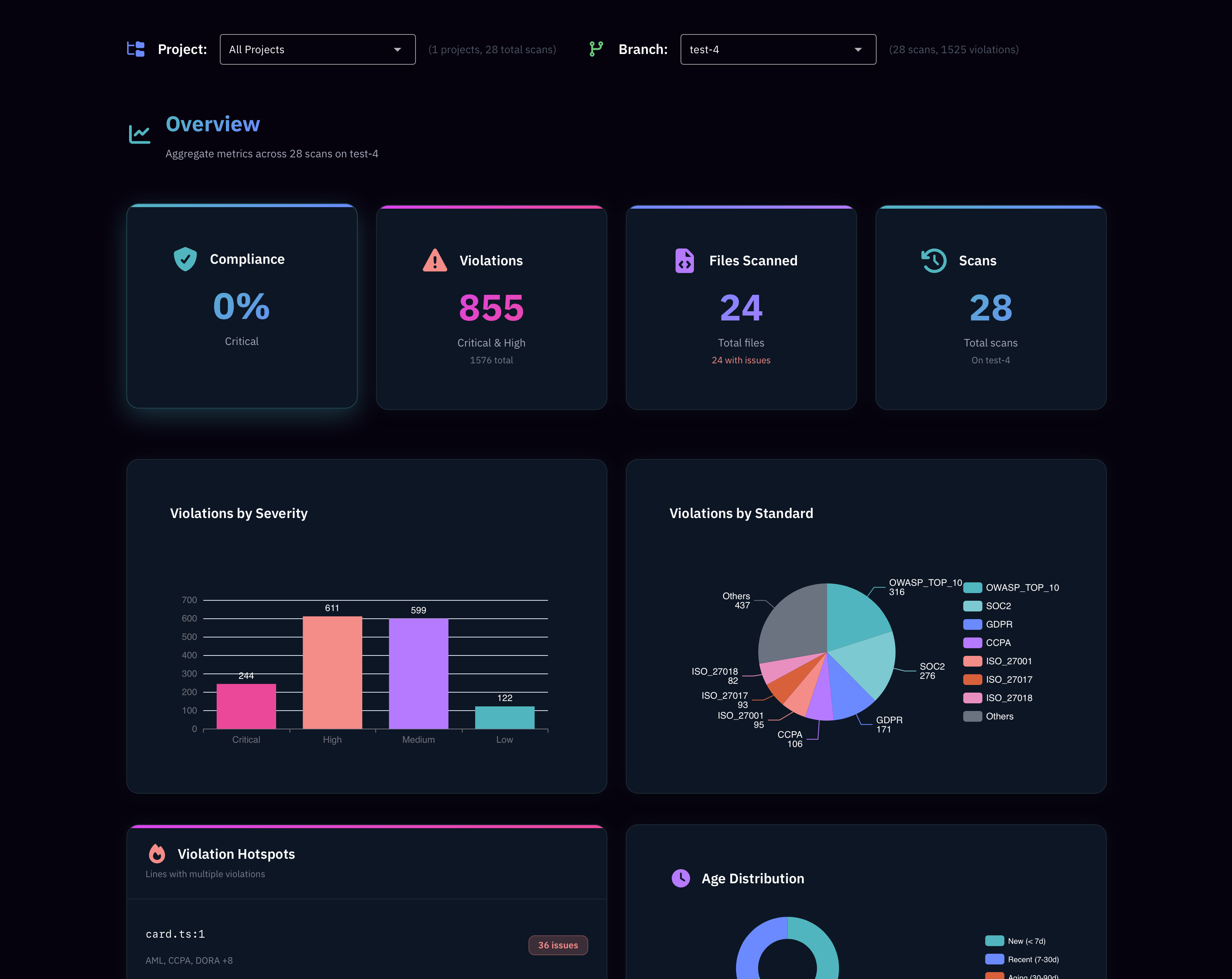
Comprehensive analytics and team management.
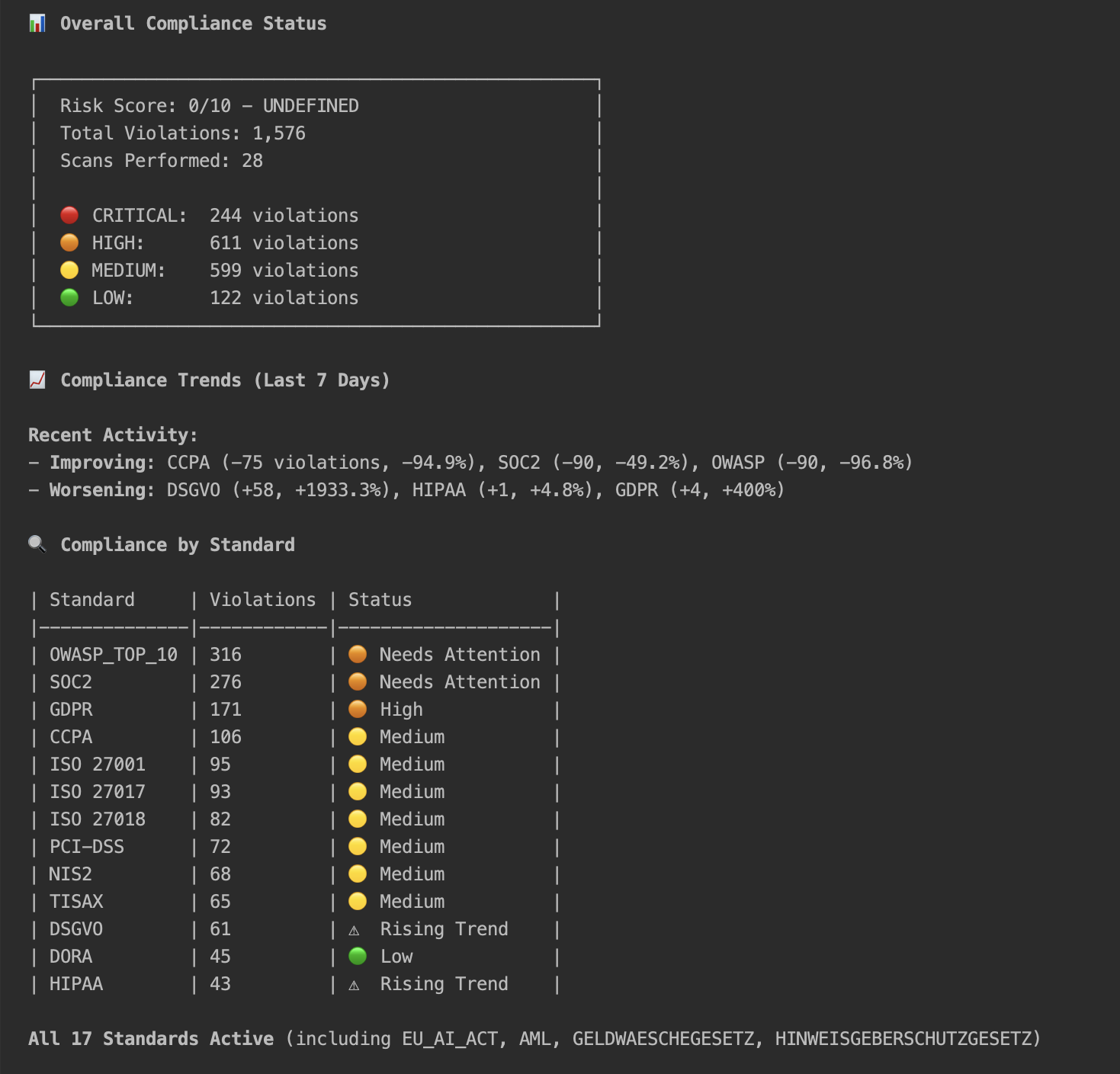
Real-time compliance monitoring in your terminal.
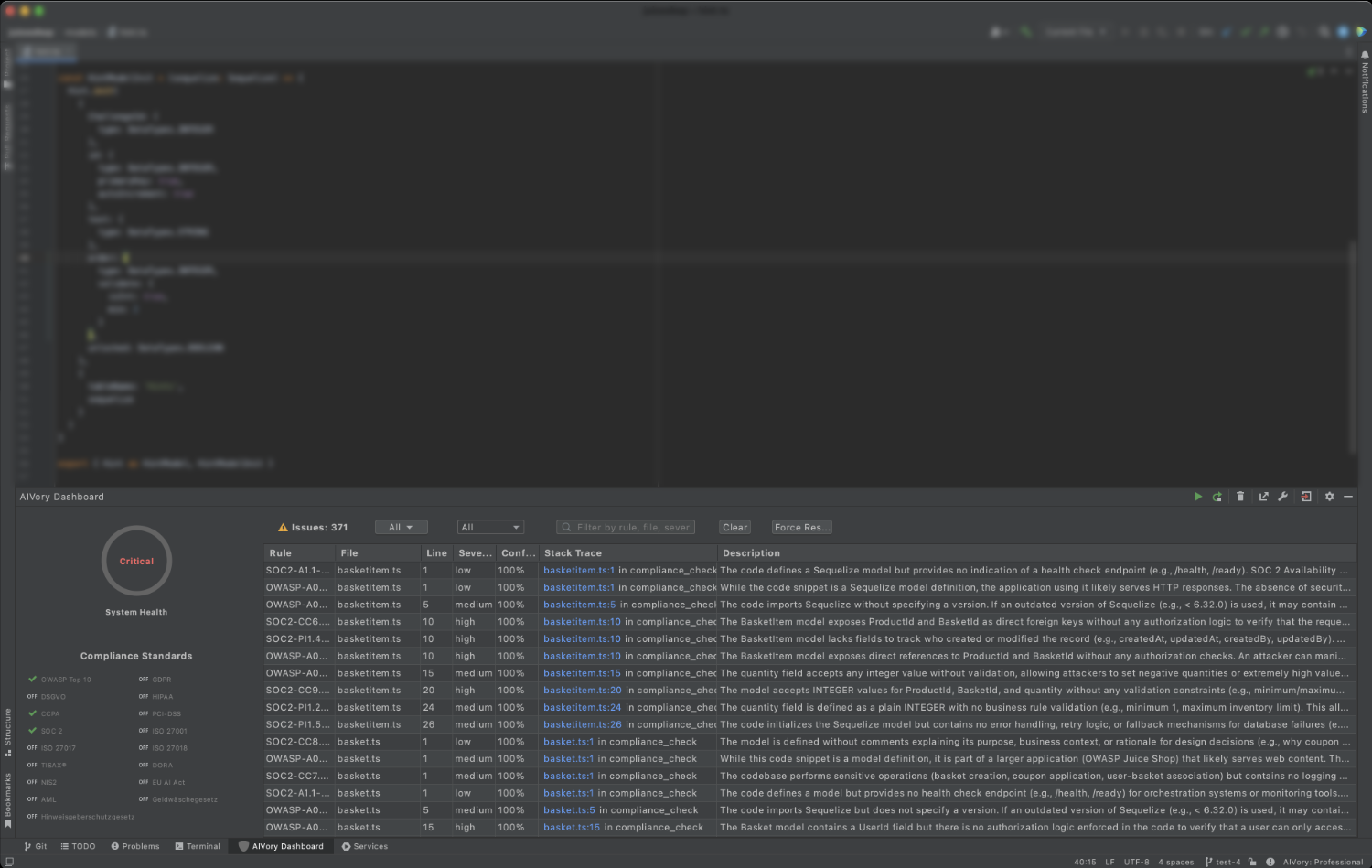
Integrated compliance insights directly in your IDE.
Never lose track of your compliance posture. Monitor violations as they happen, track improvements over time, and identify hotspots before they become problems.
Start tracking for freeIt's important to catch mistakes early. Here's why.
| Feature | Write-time agent protection | Post-commit scanning |
|---|---|---|
| Detection timing | As you type | After commit |
| Fix cost per violation* | $100 | $3K–5K |
| AI code tracking | ||
| Git platform support | Any git | GitHub/GitLab only |
| Compliance coverage | Full compliance | Security scanning only |
| IDE integration |
* Based on NIST and Ponemon Institute research: issues cost 30–50× more to fix post-deployment.
No credit card. No trial limits. Real security scanning for every developer.
Forever, no strings attached.
From $19/month.
Everything in Free, plus:
Start free forever. Upgrade for full compliance coverage.
For developers getting started.
$0forever
For small teams and growing projects.
$19/ month
No card required. Cancel anytime.
For teams requiring unlimited scans.
$39/ month
No card required. Cancel anytime.
Unlimited scans · Self-hosted LLM & data · All compliance standards · Custom integrations · SLA guarantees · White-label options.
Help shape AIVory. 50% off for the first 100 teams.
50% off our Pro and Starter plan for 6 months.
Work directly with our team to shape AIVory's roadmap.
Your compliance needs drive our development priorities.
See what violations cost your team annually.
Potential violations / month
24
Cost at write-time (with AIVory)
$2,400
Cost in production (without AIVory)
$96,000
(30–50× more expensive)
Potential savings / year
$1.1M
We support them all.
Custom rules available for Enterprise.
We felt the pain of compliance violations in production. So we built the tool we needed.
We're not building this because compliance is trendy. We're building it because AI lets you ship faster than ever — but compliance gaps can kill your company overnight. One GDPR fine. One security breach. One audit failure.
Startups need to move fast. Enterprises need to stay compliant. You shouldn't have to choose.
Ship your MVP in days, not months — with AI writing 60% of your code. But one compliance violation can end your company before it starts. Protect yourself as you scale, from day one.
Your developers use AI assistants — whether you know it or not. AI-generated code bypasses your compliance review process. Protect your enterprise before the next audit.
AIVory works the same way for a 2-person startup and a 2,000-person enterprise. Real-time compliance that scales with you. Move fast. Stay compliant. No tradeoffs.
Built by the team behind 100+ enterprise software projects and used by indie hackers and Fortune 500 teams alike.
Companies that build with confidence

"As avid users ourselves at our agency, we can vouch for AIVory working. It's become indispensable for keeping our client projects compliant while moving fast with AI-assisted development."

"With AIVory, our developers can move fast with AI assistance while staying compliant. It's the perfect balance of speed and security."
Yes. OWASP Top 10 scanning is free forever with 50 scans per week — no credit card, no trial expiry. Premium plans starting at $19 per month unlock all 18+ compliance standards, unlimited scans, AI code tracking, and team dashboards.
Guard supports 18+ standards including OWASP Top 10, GDPR, HIPAA, PCI-DSS, SOC 2, ISO 27001, CCPA, TISAX, DORA, and NIS2. The free plan covers OWASP; premium plans unlock the full library plus custom rules for enterprise teams.
Yes. Guard scans every line equally whether you wrote it or GitHub Copilot, Cursor, Claude Code, or Windsurf generated it. Premium plans also track which code came from AI assistants so you can audit AI-generated output separately.
Guard evaluates your code on every save inside your IDE. Violations appear as inline markers with a direct reference to the standard that was breached — for example "GDPR Art. 32 — unencrypted PII in log output." One-click AI fixes suggest a compliant replacement you can accept, edit, or dismiss.
Guard runs in VS Code, JetBrains IDEs (IntelliJ, PyCharm, WebStorm, and others), Cursor, Windsurf, and Antigravity. It also ships as an MCP endpoint for Claude Code and other AI agents, and a CLI for CI/CD pipelines.
No. Install the plugin or extension and Guard starts scanning in the background. There is no config file to write, no build step to add, and no separate tool to open. Violations surface inline as you code — the same way a linter highlights syntax errors.
The free plan gives you OWASP Top 10 scanning with 50 scans per week across all supported IDEs. Premium adds the full 18+ standard library, 250 or unlimited scans per week, AI code tracking, web dashboards, team collaboration features, and priority support. Enterprise adds self-hosted deployment, custom rules, and SLA guarantees.
OWASP is free. Install Guard in under a minute.