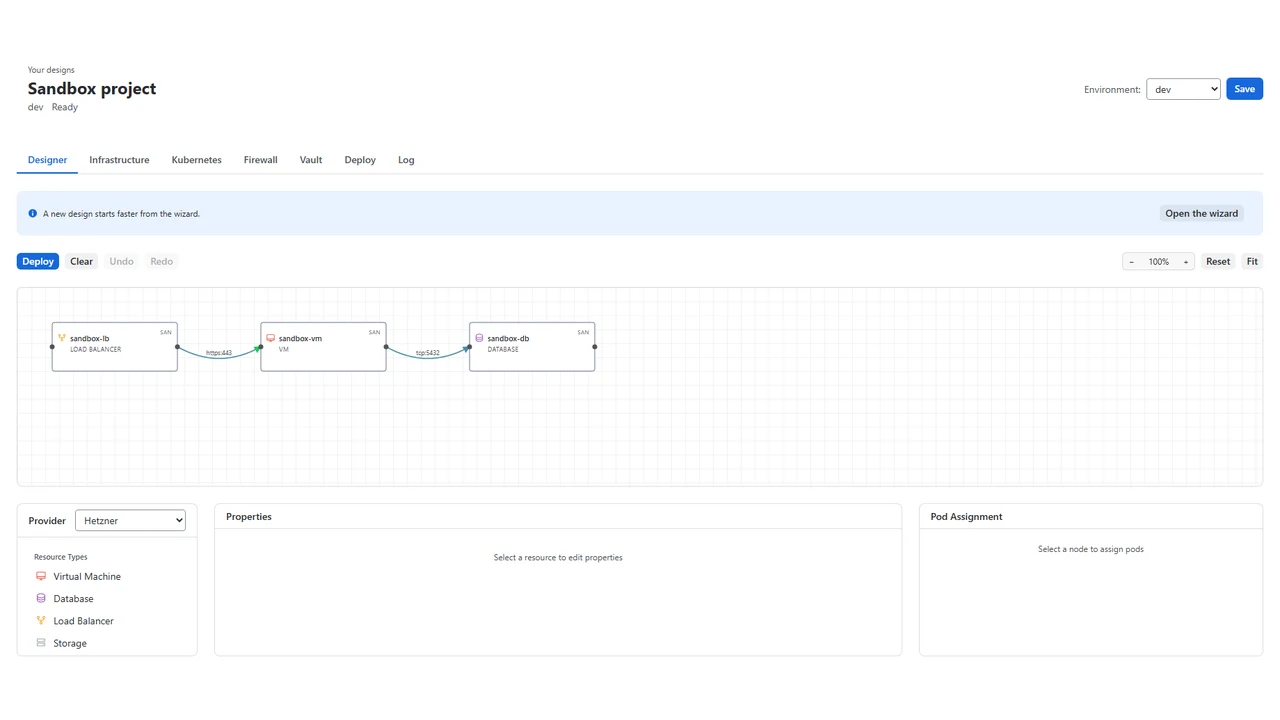
Architect Now Runs in Your Browser, and in Jira
AIVory Architect has always run inside an IDE. Open JetBrains, VS Code, Cursor, or Antigravity, and the canvas was there. That was fine for one kind of user: a developer who already lives in an editor. It was not fine for everyone else on a project who needed to look at a design, or attach one to a ticket, without installing a plugin.
Today the canvas also runs at app.aivory.net/architect/designer, in a browser, and inside Jira through a new app on the Atlassian Marketplace.
The canvas leaves the IDE
The web app is not a lighter version of the plugin. It is the same designer: the canvas, the setup wizard, Terraform generation, Infrastructure management, Kubernetes, Firewall, Vault, the deploy pipeline, and the log viewer. A design you open in the browser is the same design you would open in JetBrains, because it is stored under your AIVory account, not on a local disk.
The one piece that stays IDE only is Docker Compose. Compose files describe a local development environment, tied to the machine running them, so parsing and generating them in a browser tab does not carry the same value. Everything else in the designer works the same way in both places.
Sign in with your existing AIVory account and the designer opens directly. No install, no local Terraform binary, nothing to configure before you can look at a piece of infrastructure.
What ships in the browser
Because the web app has no local file system, it reads and writes through a connected repository instead of a project folder. You authorize AIVory against a GitHub repository, pick a branch and path, and the canvas parses whatever Terraform or Kubernetes files already live there. Generated code writes back to the same repository. Deployment, SSH access, and log streaming work the same way they do in the IDE, over the browser instead of a local terminal.
The Jira app
AIVory Architect for Jira puts the canvas where the team already works. It opens under Apps in your Jira site as its own page: the design list, the canvas, the generated Terraform, the vault, the deploy pipeline with its live log, and a read-only Kubernetes view, in the Jira theme, light and dark. Everyone on the site works on the same designs.
It is a separate listing on the Atlassian Marketplace, priced at $30 per month for up to 10 users, then $3 per user per month, with a 30 day free trial. Your Jira site keeps its own designs. Link an AIVory account to open the same designs in the web app and the IDE plugins.
Premium and Team
Pricing for the web app follows the same plans as the rest of Architect. The Free Viewer stays free: visualize any infrastructure and browse the generated config files with no time limit. Premium is $9.99 a month, or $99.99 billed annually, for one seat with full deployment and operations control.
The new addition is Team: $19 per user per month, billed annually, with a 5 seat minimum. It gives every engineer on a project the same Premium capabilities, with seats managed centrally under Billing > Seats instead of one subscription per person. AWS and Azure Marketplace listings are on the way, and private offers are available above 25 seats for larger rollouts.
What is next
The web app ships with the same designer as the plugins on day one, which is a deliberate choice: we would rather launch with full parity on infrastructure design and slower parity on browser-specific polish than the other way around. Docker Compose support will likely stay IDE only for the foreseeable future, since it is inherently local. Everything else is on the same roadmap as the plugins.
If you have wanted to show a colleague an infrastructure design without asking them to install anything, or wanted designs next to the Jira projects that track the work, that is what shipped today. Try it at app.aivory.net/architect/designer, or install AIVory Architect for Jira from the Atlassian Marketplace.